
One change is that search results are now displayed in pages, with thirty results per page. In addition, the changes mainly involve features being moved to new locations. Below is a brief overview of the most important changes in Seeker.
Personal tools
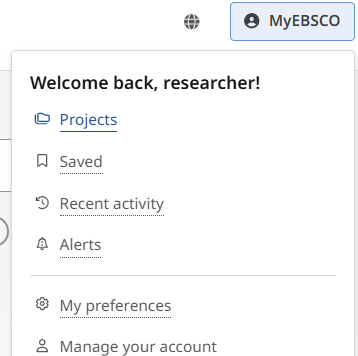
Your personal tools, such as project folders, saved items, and recent activity, have been moved to the MyEBSCO menu in the top-right corner.
You can also change the interface language in the top-right corner using the globe icon.
Links and new search options at the top
The New search and Research tools features (including a link to the journal list) are now located at the top of the page. Links to related webpages, such as Ask the Library, can also be found there.
More information
A brief introduction to Seeker, including links to support materials and guides from EBSCO, can be found here: Guide: Seeker.
Please feel free to contact the library if you have any questions.