
If you already have a salary account registered with Danske Bank from another employment, you still need to follow all the steps below regarding “New bank account registration” for your bank account to be linked to Dalarna University.
If you are not a new employee and just want to update your Bank account - go to “Register/update your bank account” further down this manual.
New bank account registration
As a new employee, you must register which Bank account you want your salary to be paid to. If Danske Bank does not have information about your Bank account, the salary will be paid via a payment notice. You then need to redeem the payout slip at a bank for a fee.
- Log in through the link at Danske Banks website: Lönetjänst | Danske Bank
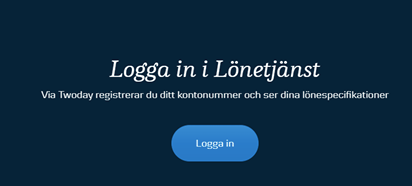
- Scroll down to “Logga in till lönetjänst” and then click ”Logga in”.
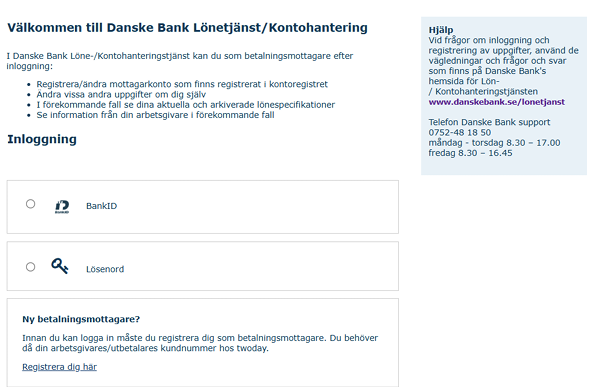
- First go to ”Ny betalningsmottagare?” and then click “Registrera dig här”.
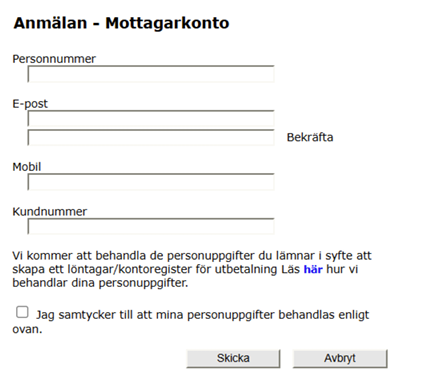
- Fill in your personal number, email address and Kundnummer is 79152. Tick the box ”Jag samtycker till att mina personuppgifter behandlas enligt ovan” and click ”Skicka”.
- If you get the message below, it means that you are already registered as a user at Danske Bank and therefore you can log on immediately. Click “Avbryt” and go to the chapter “Register/Update your bank account” further down this manual.

- A confirmation shows your registration. You will now receive an e-mail with a link to log in to.
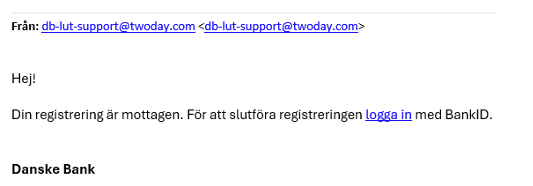
- Log in using your Bank Id, identify at twoday AB – Utbetalningstjänst, and fulfill the registration. You can find information about how to register your bank account underneath the box “Lönekonto”. Finish by clicking “Uppdatera”.
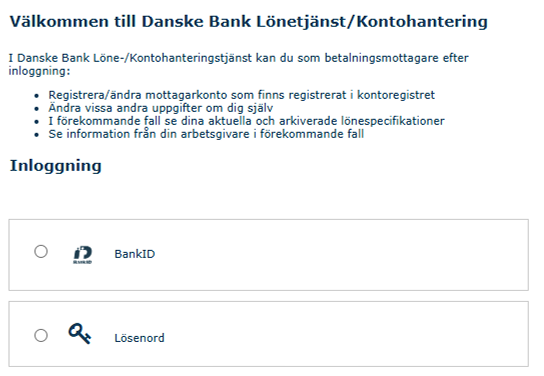
Register/update your bank account
- Log in through the link at Danske Banks website: Lönetjänst | Danske Bank
- Scroll down to “Logga in till lönetjänst” and then click ”Logga in”.
- To update your bank account, click “Min profil”.
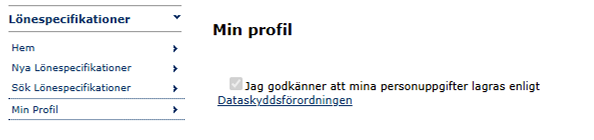
- Register your bank account details: Click Add bank account details in the Bank account details section and enter your bank account details. Click Save.

- Register your bank account details. If you already have another employer, you still need to add bank account details linked to Dalarna University. Click Add bank account details, link the account to Dalarna University, and click Save.
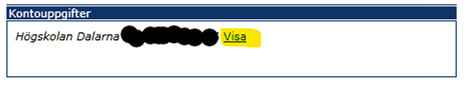
- Change your bank account details. Click View, update the details to your new bank account, and click Save.
Last reviewed: